> ## Documentation Index
> Fetch the complete documentation index at: https://strapi-suite.littlebox.pt/llms.txt
> Use this file to discover all available pages before exploring further.
# Menus
> Learn how to create dynamic menus and connect them to the frontend using the API
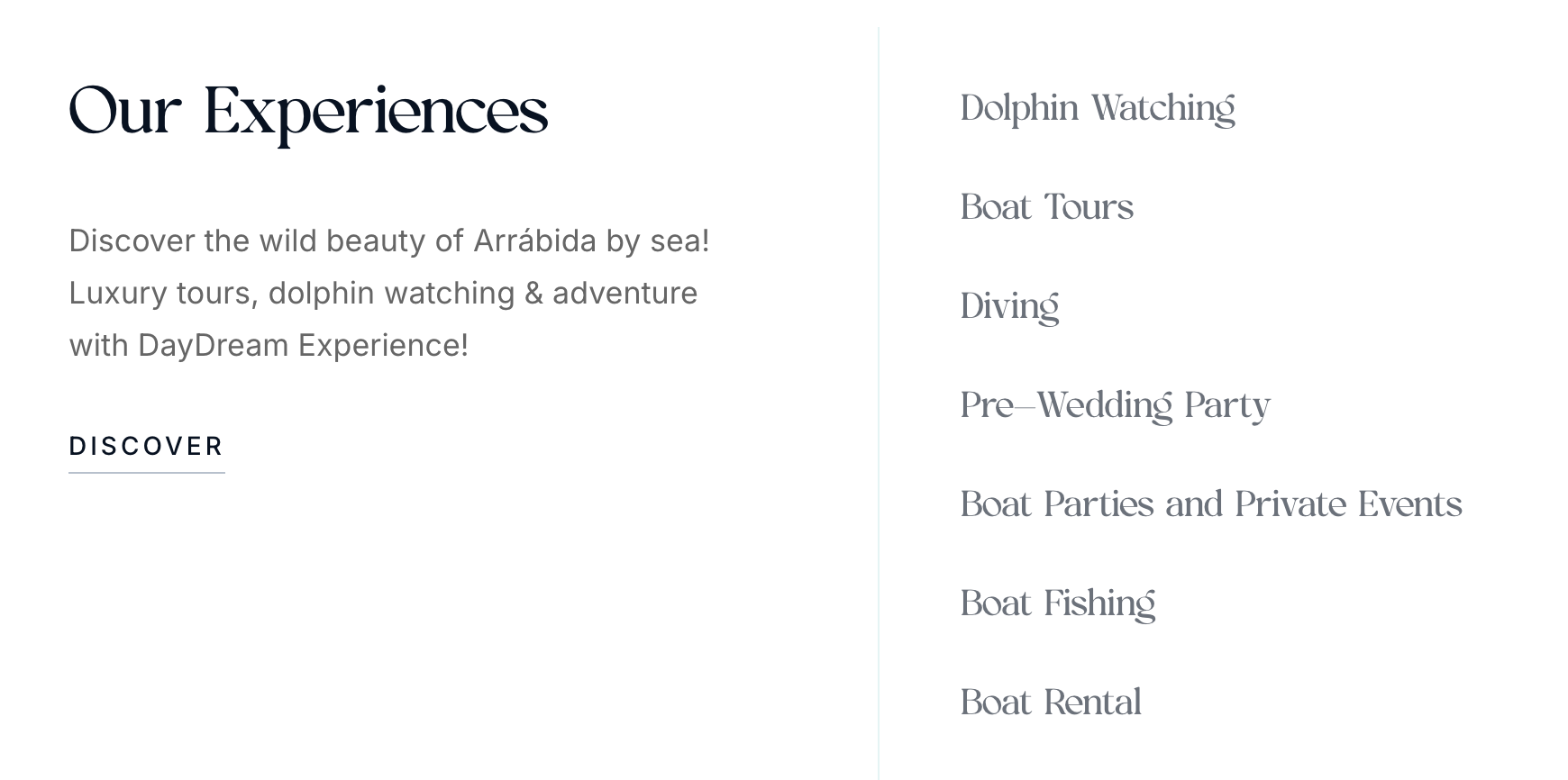
Menus is a module that lets you manage navigation menus through an intuitive drag-and-drop interface.
It also provides a simple API for easy integration with the frontend.
You can build the frontend however you like, but our [ready-to-use Next.js Frontend](/frontend/introduction) makes integration easier by handling repetitive tasks for you.
## How to create a menu?
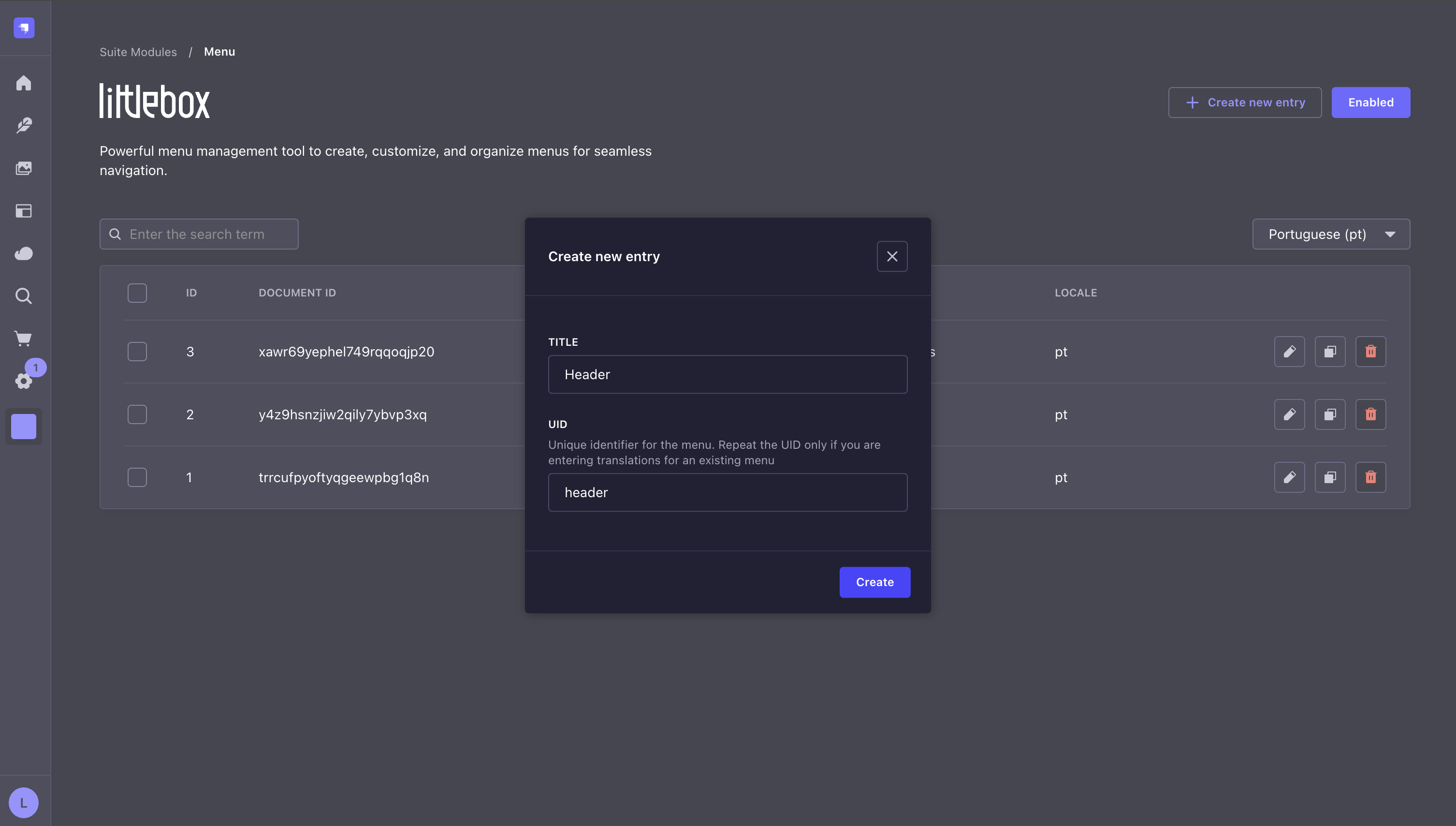
**Step 1**: Access the Strapi admin panel.\
**Step 2**: Go to the Littlebox Strapi Suite.\
**Step 3**: Select "Menu".\
**Step 4**: Click "Create new entry".\
**Step 5**: Set a title and a UID. The UID is used to fetch menu data through the [API](/backend/guides/menus#api).
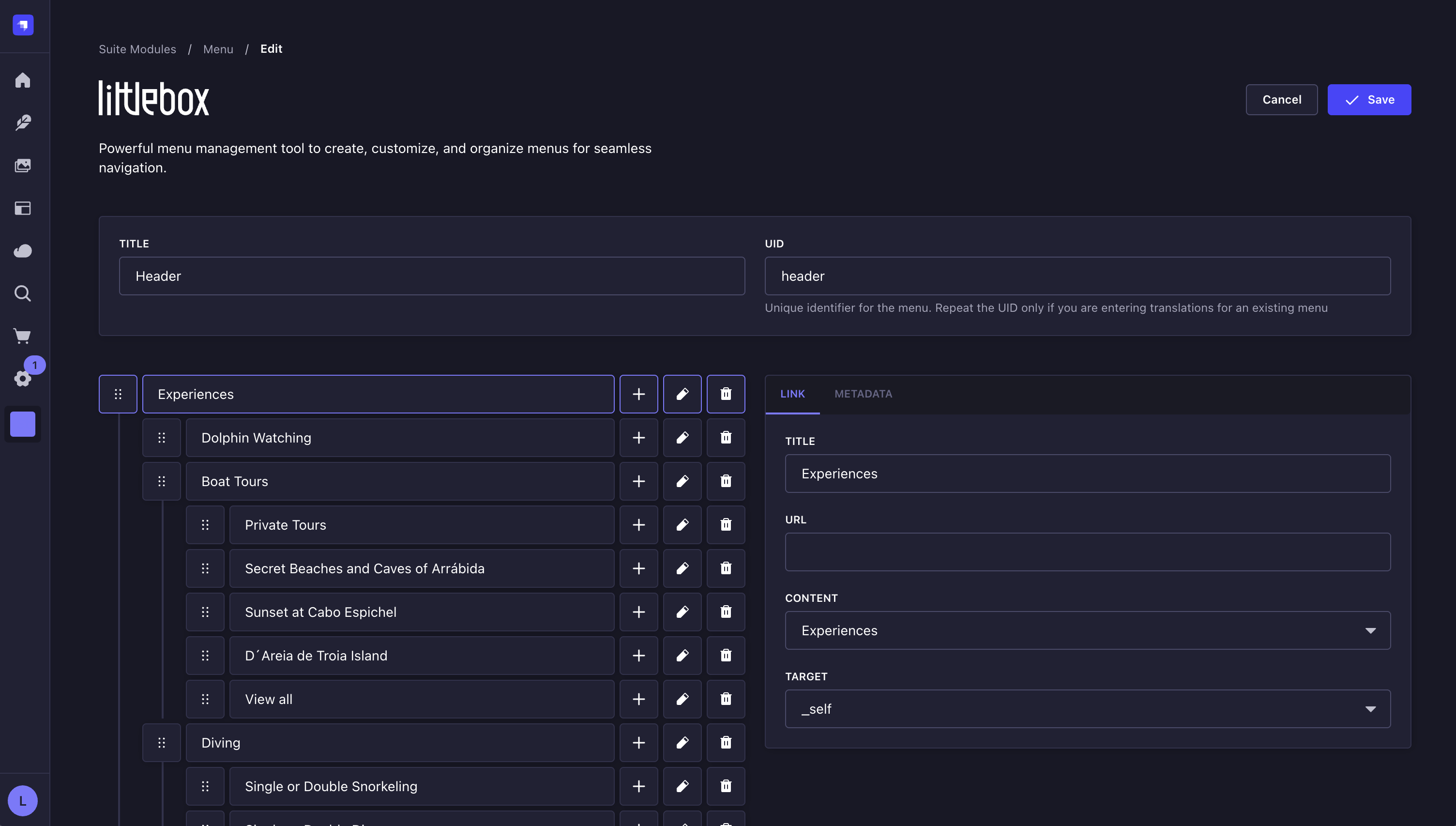
 **Step 6**: Add new items to the menu.\
**Step 7**: Click the `::` icon to drag and reorder the items.\
**Step 8**: To create nested items, click the `+` icon on an existing item.
**Step 6**: Add new items to the menu.\
**Step 7**: Click the `::` icon to drag and reorder the items.\
**Step 8**: To create nested items, click the `+` icon on an existing item.
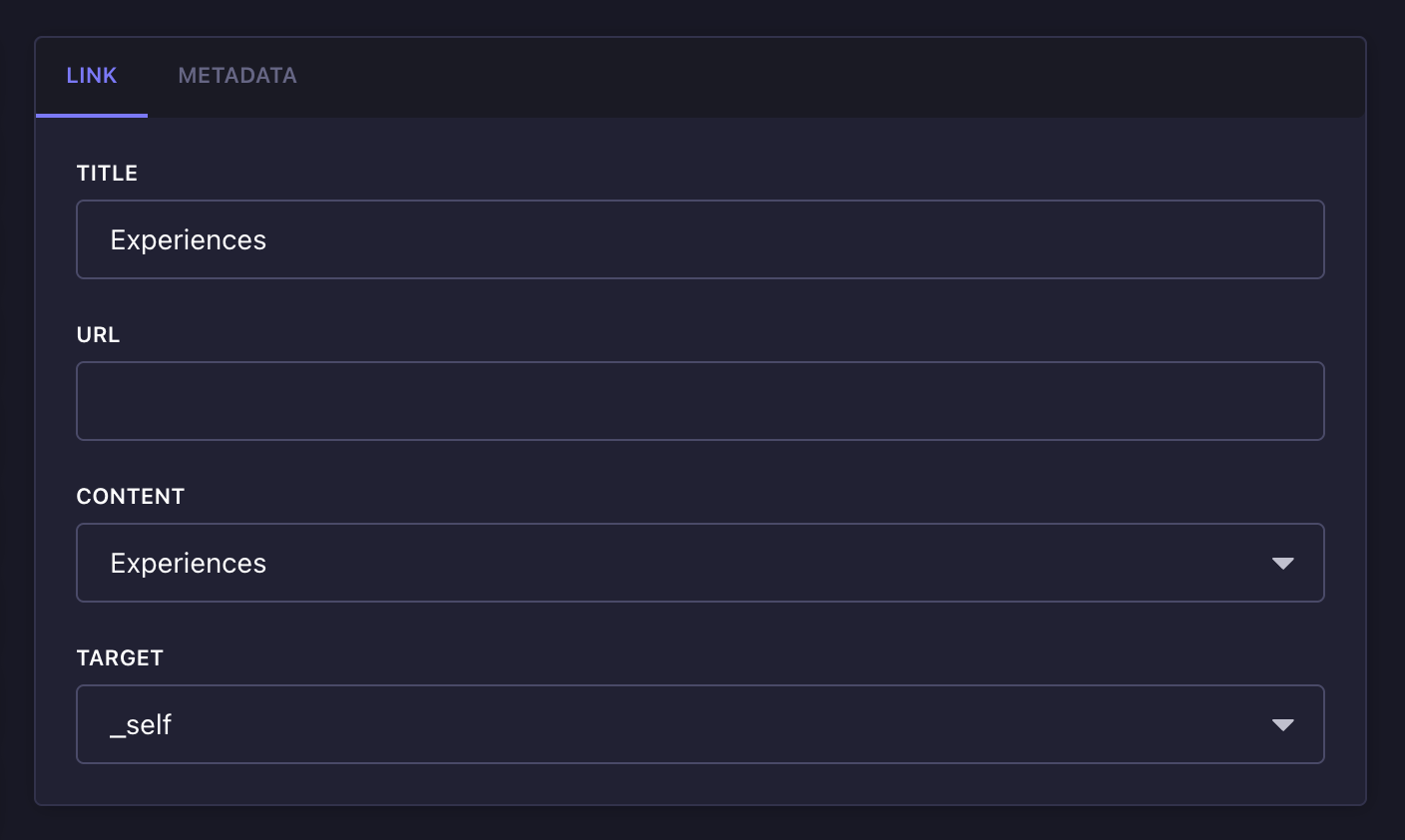
 **Step 9**: Click the `edit` icon to view or edit the link properties. You can either set a custom URL or link to existing content using a defined [slug](/backend/guides/slug). This is useful because if the content slug changes, the menu updates automatically. You can also define the link target:
* `_blank` Opens the linked document in a new window or tab.
* `_self` Opens the linked document in the same frame as it was clicked.
* `_parent` Opens the linked document in the parent frame.
* `_top` Opens the linked document in the full body of the window.
**Step 9**: Click the `edit` icon to view or edit the link properties. You can either set a custom URL or link to existing content using a defined [slug](/backend/guides/slug). This is useful because if the content slug changes, the menu updates automatically. You can also define the link target:
* `_blank` Opens the linked document in a new window or tab.
* `_self` Opens the linked document in the same frame as it was clicked.
* `_parent` Opens the linked document in the parent frame.
* `_top` Opens the linked document in the full body of the window.
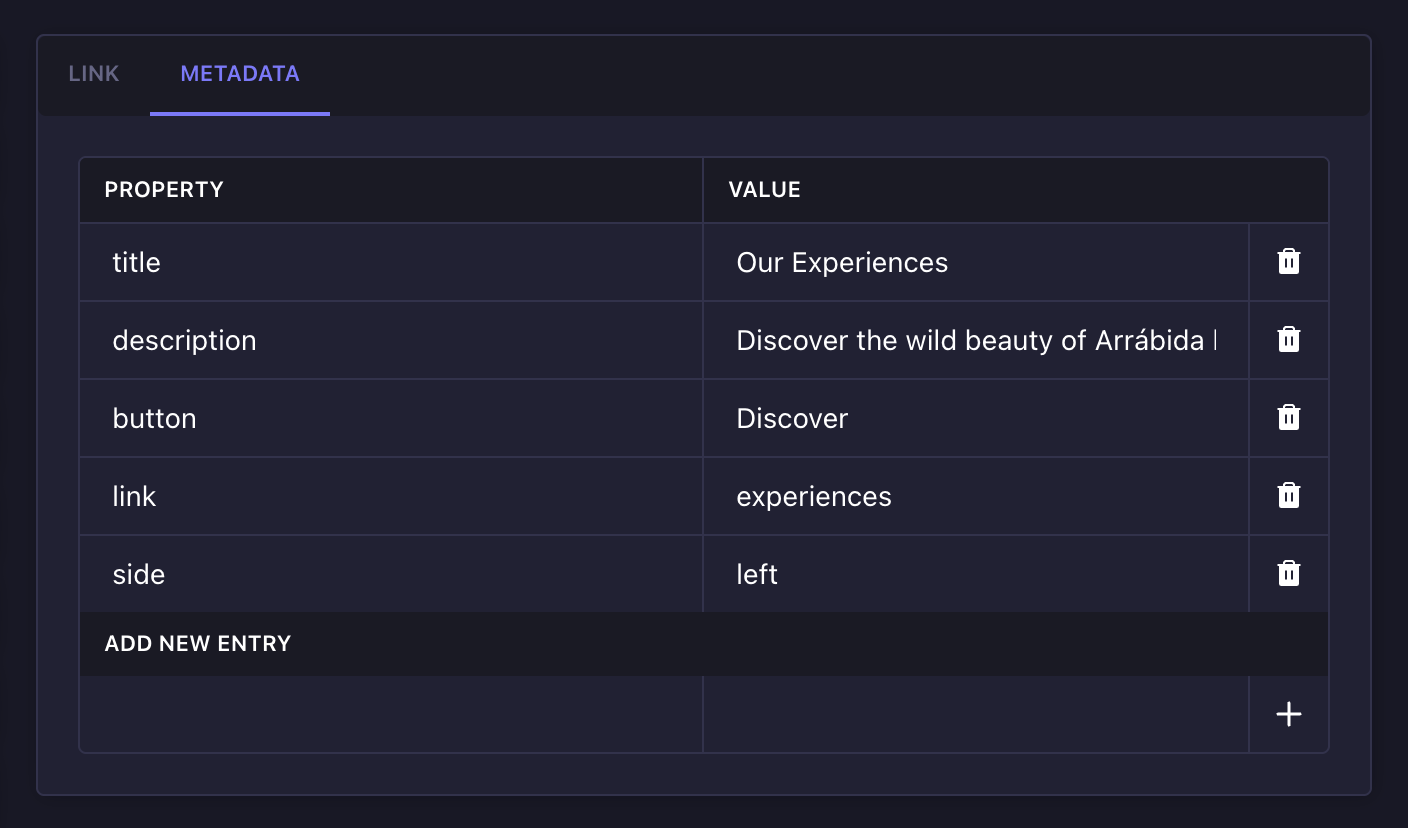
 **Step 10**: Each menu item includes metadata. You can use this metadata to build more dynamic and visually rich menus on the frontend, making it easier to manage everything in one place.
 ## API
To get the data from the frontend, use your preferred HTTP client:
```bash theme={null}
curl -X GET "/api/littlebox-strapi-suite/modules/menus?locale="
```
```json theme={null}
[
{
"id": 1,
"documentId": "rvycb4q234yqz47g1v69mzkm",
"title": "Header",
"uid": "header",
"locale": "en",
"createdAt": "2025-04-13T19:43:24.092Z",
"updatedAt": "2025-04-13T19:48:35.207Z",
"publishedAt": "2025-04-13T19:43:24.092Z",
"children": [
{
"id": 1,
"documentId": "k6phd1g4cf7ysqw527ok78d5",
"menuId": "rvycb4q234yqz47g1v69mzkm",
"parentId": null,
"title": "Experiences",
"url": "experiences",
"target": "_self",
"order": 1,
"metadata": {},
"createdAt": "2025-04-13T19:48:35.216Z",
"updatedAt": "2025-04-13T19:48:35.216Z",
"publishedAt": "2025-04-13T19:48:35.216Z",
"children": [
{
"id": 2,
"documentId": "leb5vbdlthaw9uvbfo8njwsv",
"menuId": "rvycb4q234yqz47g1v69mzkm",
"parentId": "1",
"title": "Dolphin Watching",
"url": "experiences/dolphin-watching",
"target": "_blank",
"order": 1,
"metadata": {},
"createdAt": "2025-04-13T19:48:35.224Z",
"updatedAt": "2025-04-13T19:48:35.224Z",
"publishedAt": "2025-04-13T19:48:35.225Z",
"children": []
}
]
},
{
"id": 3,
"documentId": "zakerhh8fx912il34lxkj04f",
"menuId": "rvycb4q234yqz47g1v69mzkm",
"parentId": null,
"title": "Transfer",
"url": "transfer",
"target": "_self",
"order": 2,
"metadata": {},
"createdAt": "2025-04-13T19:48:35.234Z",
"updatedAt": "2025-04-13T19:48:35.234Z",
"publishedAt": "2025-04-13T19:48:35.234Z",
"children": []
}
]
}
]
```
Learn how our frontend streamlines integration with Strapi by automating repetitive tasks.
Explore our hosting solutions for staging and production environments.
## API
To get the data from the frontend, use your preferred HTTP client:
```bash theme={null}
curl -X GET "/api/littlebox-strapi-suite/modules/menus?locale="
```
```json theme={null}
[
{
"id": 1,
"documentId": "rvycb4q234yqz47g1v69mzkm",
"title": "Header",
"uid": "header",
"locale": "en",
"createdAt": "2025-04-13T19:43:24.092Z",
"updatedAt": "2025-04-13T19:48:35.207Z",
"publishedAt": "2025-04-13T19:43:24.092Z",
"children": [
{
"id": 1,
"documentId": "k6phd1g4cf7ysqw527ok78d5",
"menuId": "rvycb4q234yqz47g1v69mzkm",
"parentId": null,
"title": "Experiences",
"url": "experiences",
"target": "_self",
"order": 1,
"metadata": {},
"createdAt": "2025-04-13T19:48:35.216Z",
"updatedAt": "2025-04-13T19:48:35.216Z",
"publishedAt": "2025-04-13T19:48:35.216Z",
"children": [
{
"id": 2,
"documentId": "leb5vbdlthaw9uvbfo8njwsv",
"menuId": "rvycb4q234yqz47g1v69mzkm",
"parentId": "1",
"title": "Dolphin Watching",
"url": "experiences/dolphin-watching",
"target": "_blank",
"order": 1,
"metadata": {},
"createdAt": "2025-04-13T19:48:35.224Z",
"updatedAt": "2025-04-13T19:48:35.224Z",
"publishedAt": "2025-04-13T19:48:35.225Z",
"children": []
}
]
},
{
"id": 3,
"documentId": "zakerhh8fx912il34lxkj04f",
"menuId": "rvycb4q234yqz47g1v69mzkm",
"parentId": null,
"title": "Transfer",
"url": "transfer",
"target": "_self",
"order": 2,
"metadata": {},
"createdAt": "2025-04-13T19:48:35.234Z",
"updatedAt": "2025-04-13T19:48:35.234Z",
"publishedAt": "2025-04-13T19:48:35.234Z",
"children": []
}
]
}
]
```
Learn how our frontend streamlines integration with Strapi by automating repetitive tasks.
Explore our hosting solutions for staging and production environments.