> ## Documentation Index
> Fetch the complete documentation index at: https://strapi-suite.littlebox.pt/llms.txt
> Use this file to discover all available pages before exploring further.
# Page Attributes
> Learn how to use a page`s attributes
Any document can be treated as a page once a slug is assigned.
This makes it possible to define properties that support frontend integration, such as setting a parent document and
inheriting its [slug](/backend/guides/slug) to create a hierarchical URL.
## Parent
It’s useful when defining a page hierarchy, where the child automatically inherits the parent’s slug. This creates a clean, SEO-friendly URL.
For example, in an application with a news listing page at `/news`, clicking on a news item opens a detail page with a URL based on the parent page.
In this case, the URL combines the parent slug `/news` with the news title, such as "Littlebox Suite helped me build websites faster", resulting in a final URL like `/news/littlebox-suite-helped-me-build-websites-faster`.
**Step 1**: Access the Strapi admin panel.\
**Step 2**: Go to the Content-Type Builder.\
**Step 3**: Create a new single type called `news`.\
**Step 4**: Add the [slug](/backend/guides/slug) custom field and title field.\
**Step 5**: Create a new collection type called `news`.\
**Step 6**: Add the custom [slug](/backend/guides/slug) field and title field.\
**Step 7**: Go to the Content Manager.\
**Step 8**: Create a new entry in the single type with the title "News".
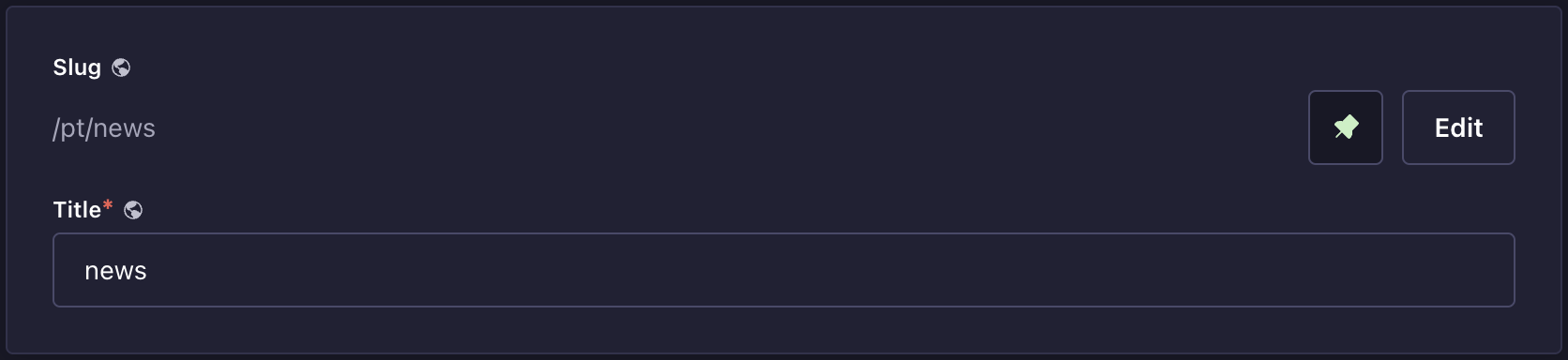 **Step 9**: Create a new entry in the collection type with the title "Littlebox Suite helped me build websites faster".\
**Step 10**: In the left panel, under the Page Attributes section, set the parent to News.
**Step 9**: Create a new entry in the collection type with the title "Littlebox Suite helped me build websites faster".\
**Step 10**: In the left panel, under the Page Attributes section, set the parent to News.
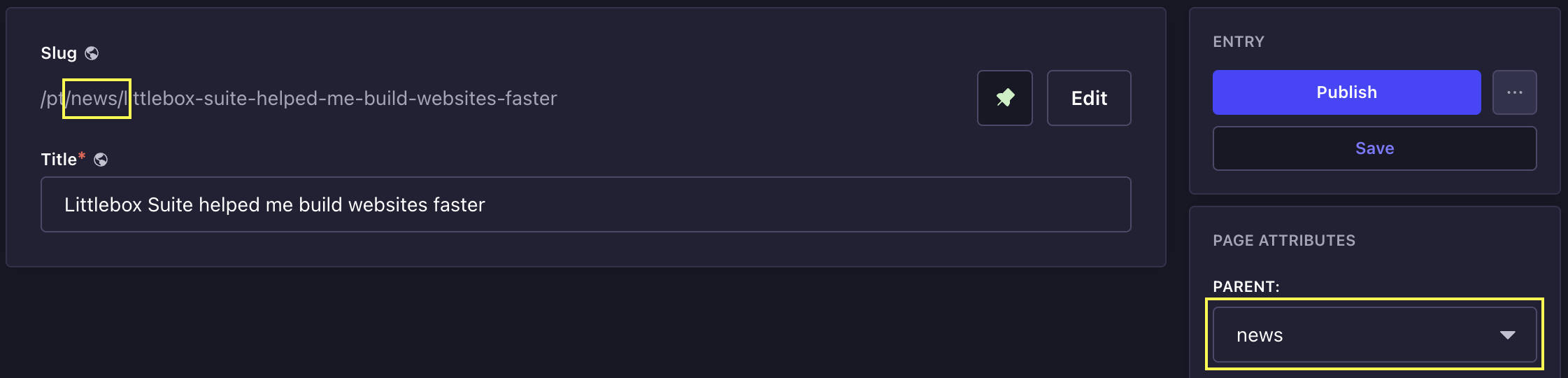 The document automatically inherits the parent’s slug and updates it whenever the parent’s slug changes.
This hierarchy can extend to three, four, or as many levels as needed. Simply select a parent for each document, as long as that parent also has its own parent.
## Template
This is useful when used with our [Next.js frontend](/frontend/introduction).\
This feature injects the document content directly into the template, making integration easier.
**Step 1**: Access the Strapi admin panel.\
**Step 2**: Go to the Littlebox Strapi Suite.\
**Step 3**: Select "Template".\
**Step 4**: Click "Create new entry".\
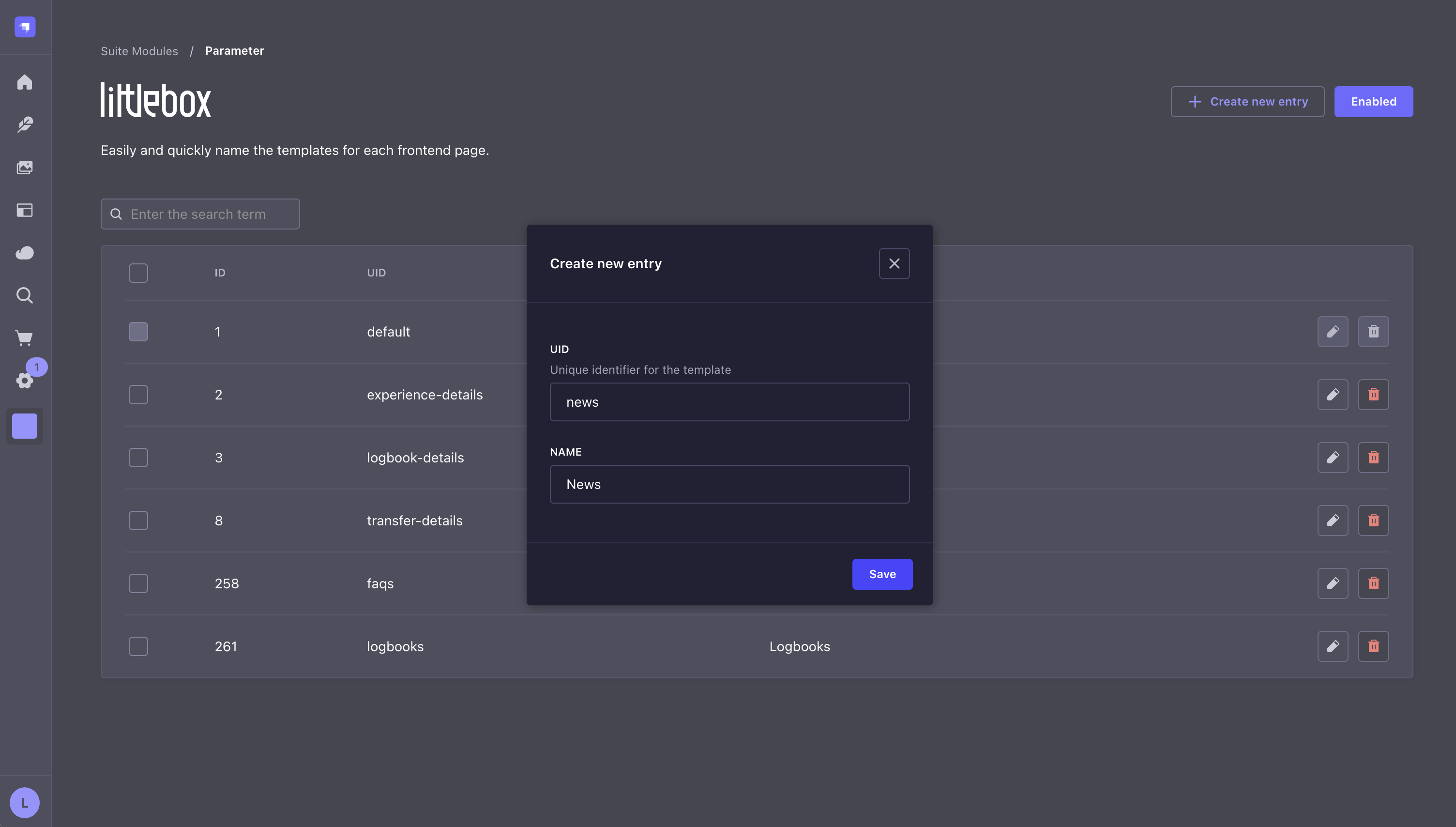
**Step 5**: Set a name and a UID. The UUID is used to locate the `.jsx` or `.tsx` file where the data will be injected.
The document automatically inherits the parent’s slug and updates it whenever the parent’s slug changes.
This hierarchy can extend to three, four, or as many levels as needed. Simply select a parent for each document, as long as that parent also has its own parent.
## Template
This is useful when used with our [Next.js frontend](/frontend/introduction).\
This feature injects the document content directly into the template, making integration easier.
**Step 1**: Access the Strapi admin panel.\
**Step 2**: Go to the Littlebox Strapi Suite.\
**Step 3**: Select "Template".\
**Step 4**: Click "Create new entry".\
**Step 5**: Set a name and a UID. The UUID is used to locate the `.jsx` or `.tsx` file where the data will be injected.
 **Step 6**: Go to the Content Manager.\
**Step 7**: Create a new collection or a single type. Check the [requirements](/backend/installation#add-required-fields) before creating a new document.\
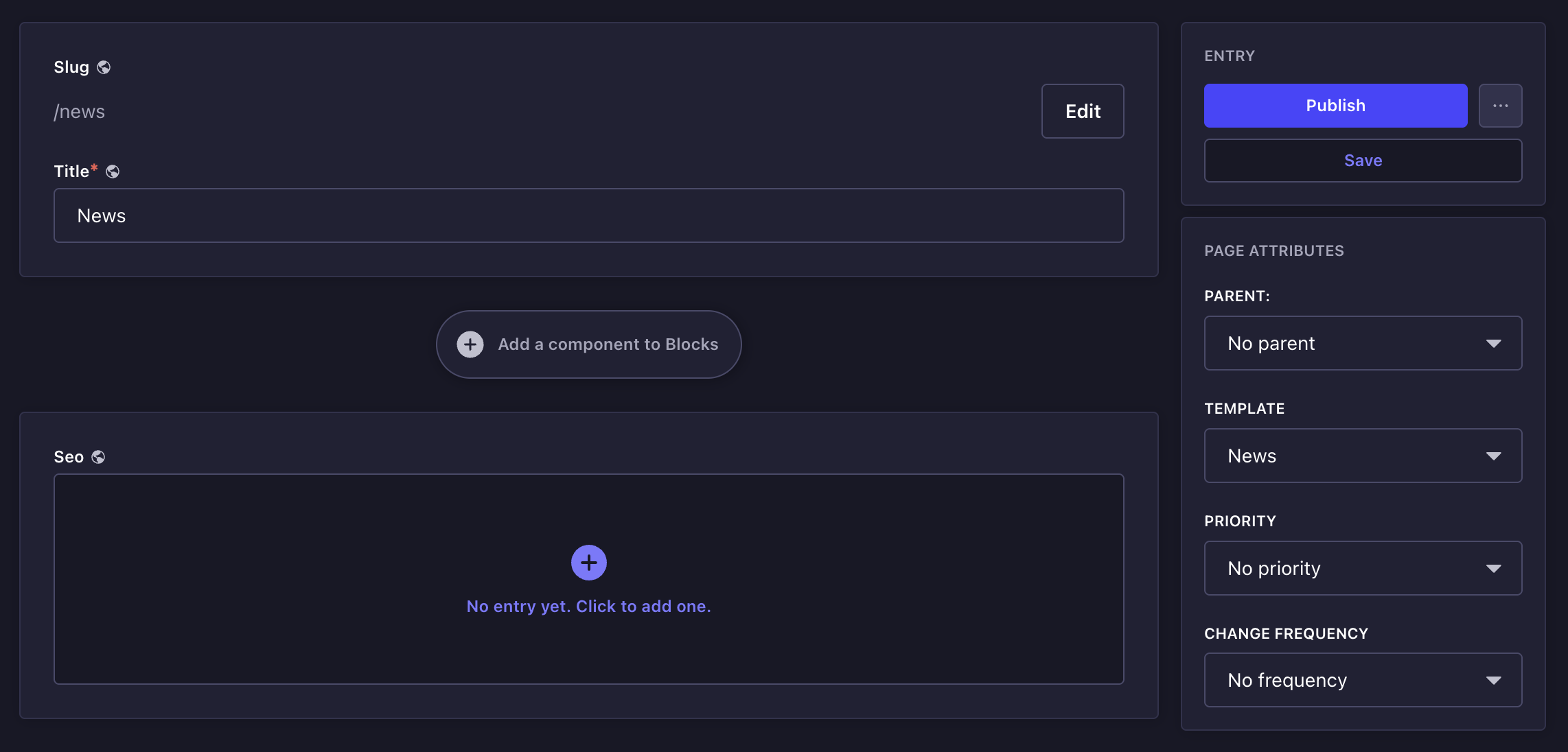
**Step 8**: Select the template created in `step 5` and save it.
**Step 6**: Go to the Content Manager.\
**Step 7**: Create a new collection or a single type. Check the [requirements](/backend/installation#add-required-fields) before creating a new document.\
**Step 8**: Select the template created in `step 5` and save it.
 For more information on how to retrieve data in the template, read the [template documentation](/frontend/guides/templates) in the frontend section.
## Priority and change frequency
In SEO, especially in XML sitemaps, the tags priority and changefreq (change frequency) are used to inform search engines about the relative importance of each page and how often the content is likely to change.
Although these tags don't guarantee that Google or other search engines will follow the suggestions exactly, they still provide helpful guidance.
For more information, read the [sitemap documentation](/frontend/guides/seo#sitemap) in the frontend section.
## API
To get the data from the frontend, use your preferred HTTP client:
```bash theme={null}
curl -X GET "/api/littlebox-strapi-suite/modules/pages?slug=&properties=attributes"
```
```json theme={null}
{
"document": {
"id": 26,
"documentId": "i111r5p3pa73r6tm71b7lh86",
"title": "Littlebox Suite helped me build websites faster",
"slug": "news/littlebox-suite-helped-me-build-websites-faster",
"createdAt": "2025-04-13T21:32:18.148Z",
"updatedAt": "2025-04-13T21:50:12.142Z",
"publishedAt": "2025-04-13T21:50:12.161Z",
"locale": "en",
"localizations": [
{
"id": 27,
"documentId": "i111r5p3pa73r6tm71b7lh86",
"title": "Littlebox Suite ajudou-me a construir sites mais rápido",
"slug": "pt/noticias/littlebox-suite-ajudou-me-a-construir-sites-mais-rapido",
"createdAt": "2025-04-13T21:37:55.693Z",
"updatedAt": "2025-04-13T22:05:35.160Z",
"publishedAt": "2025-04-13T22:05:35.185Z",
"locale": "pt"
}
]
},
"attributes": {
"template": "default",
"priority": "0.5",
"frequency": "never",
"parent": {
"id": "wnzxub0s3ghckznjdkshgcw7",
"model": "api::page.page"
}
}
}
```
Learn how our frontend streamlines integration with Strapi by automating repetitive tasks.
Explore our hosting solutions for staging and production environments.
For more information on how to retrieve data in the template, read the [template documentation](/frontend/guides/templates) in the frontend section.
## Priority and change frequency
In SEO, especially in XML sitemaps, the tags priority and changefreq (change frequency) are used to inform search engines about the relative importance of each page and how often the content is likely to change.
Although these tags don't guarantee that Google or other search engines will follow the suggestions exactly, they still provide helpful guidance.
For more information, read the [sitemap documentation](/frontend/guides/seo#sitemap) in the frontend section.
## API
To get the data from the frontend, use your preferred HTTP client:
```bash theme={null}
curl -X GET "/api/littlebox-strapi-suite/modules/pages?slug=&properties=attributes"
```
```json theme={null}
{
"document": {
"id": 26,
"documentId": "i111r5p3pa73r6tm71b7lh86",
"title": "Littlebox Suite helped me build websites faster",
"slug": "news/littlebox-suite-helped-me-build-websites-faster",
"createdAt": "2025-04-13T21:32:18.148Z",
"updatedAt": "2025-04-13T21:50:12.142Z",
"publishedAt": "2025-04-13T21:50:12.161Z",
"locale": "en",
"localizations": [
{
"id": 27,
"documentId": "i111r5p3pa73r6tm71b7lh86",
"title": "Littlebox Suite ajudou-me a construir sites mais rápido",
"slug": "pt/noticias/littlebox-suite-ajudou-me-a-construir-sites-mais-rapido",
"createdAt": "2025-04-13T21:37:55.693Z",
"updatedAt": "2025-04-13T22:05:35.160Z",
"publishedAt": "2025-04-13T22:05:35.185Z",
"locale": "pt"
}
]
},
"attributes": {
"template": "default",
"priority": "0.5",
"frequency": "never",
"parent": {
"id": "wnzxub0s3ghckznjdkshgcw7",
"model": "api::page.page"
}
}
}
```
Learn how our frontend streamlines integration with Strapi by automating repetitive tasks.
Explore our hosting solutions for staging and production environments.