> ## Documentation Index
> Fetch the complete documentation index at: https://strapi-suite.littlebox.pt/llms.txt
> Use this file to discover all available pages before exploring further.
# Parameters
> Learn how to create parameters and connect them to the frontend using the API
Parameters are used to control behavior without changing the source code.
They store important information that the system need at runtime across different environments.
## How to create a parameter?
**Step 1**: Access the Strapi admin panel.\
**Step 2**: Go to the Littlebox Strapi Suite.\
**Step 3**: Select "Parameter".\
**Step 4**: Click "Create new entry".\
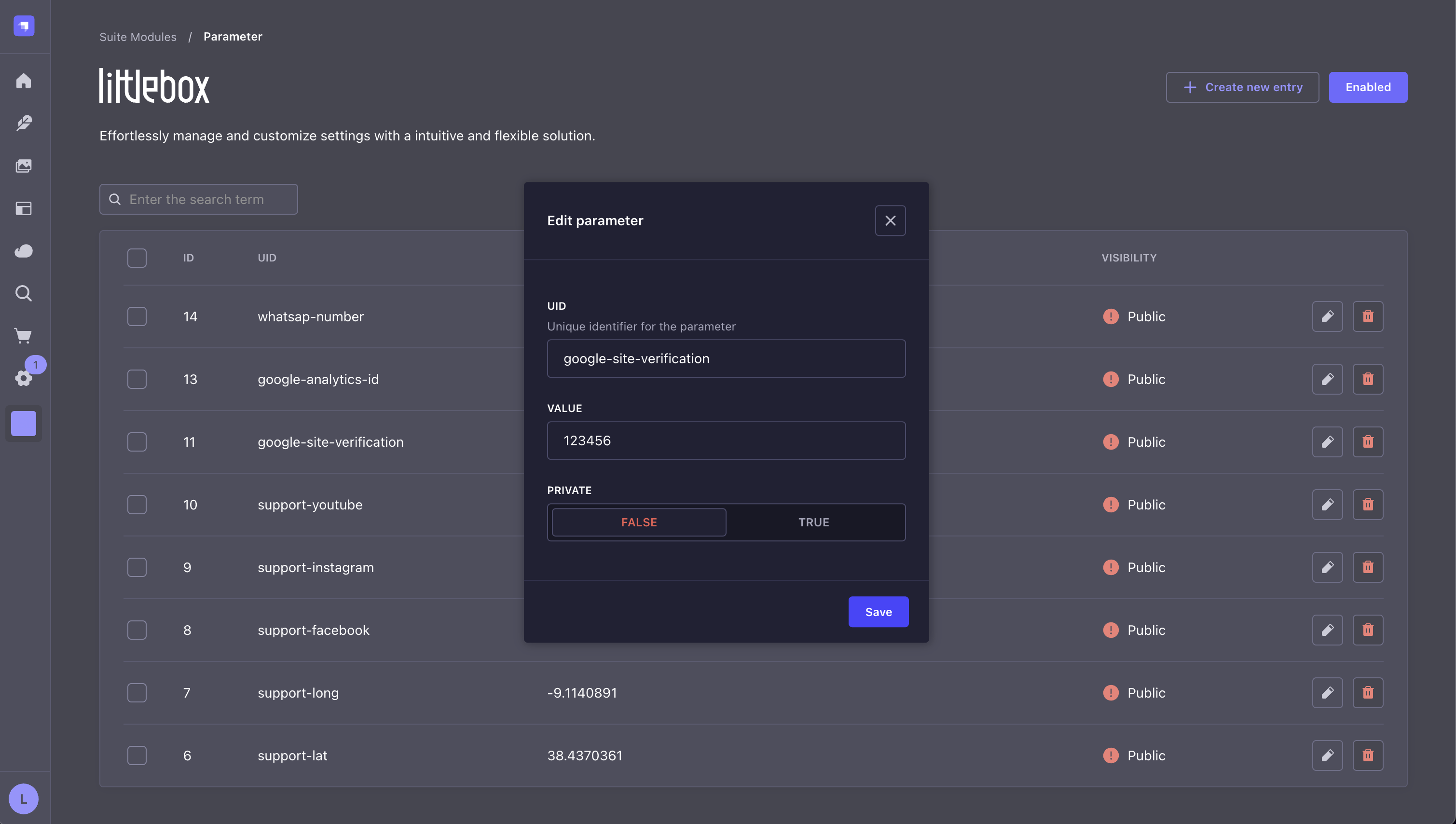
**Step 5**: Set the value, the UID, and whether the parameter is `private` (available only to the backend and other plugins) or `public` (also available to the frontend).
 ## API
To get the data from the frontend, use your preferred HTTP client:
```bash theme={null}
curl -X GET "/api/littlebox-strapi-suite/modules/parameters"
```
```json theme={null}
[
{
"uid": "recaptcha-public-key",
"value": "iuyTYYT7ybknokdiuYTtdjapodu"
}
]
```
This request will only return public parameters. To get the private parameters from the Strapi backend (e.g. for use in other plugins), use the `@strapi/strapi/admin` library:
```javascript theme={null}
import { getFetchClient } from '@strapi/strapi/admin';
const { get } = getFetchClient();
const data = await get('/littlebox-strapi-suite/admin/parameters');
```
Learn how our frontend streamlines integration with Strapi by automating repetitive tasks.
Explore our hosting solutions for staging and production environments.
## API
To get the data from the frontend, use your preferred HTTP client:
```bash theme={null}
curl -X GET "/api/littlebox-strapi-suite/modules/parameters"
```
```json theme={null}
[
{
"uid": "recaptcha-public-key",
"value": "iuyTYYT7ybknokdiuYTtdjapodu"
}
]
```
This request will only return public parameters. To get the private parameters from the Strapi backend (e.g. for use in other plugins), use the `@strapi/strapi/admin` library:
```javascript theme={null}
import { getFetchClient } from '@strapi/strapi/admin';
const { get } = getFetchClient();
const data = await get('/littlebox-strapi-suite/admin/parameters');
```
Learn how our frontend streamlines integration with Strapi by automating repetitive tasks.
Explore our hosting solutions for staging and production environments.