> ## Documentation Index
> Fetch the complete documentation index at: https://strapi-suite.littlebox.pt/llms.txt
> Use this file to discover all available pages before exploring further.
# Slug
> Learn how to create slugs and connect them to the frontend using the API
The slug is a URL that clearly and user-friendly identifies the content of a page.
It’s important because it improves user experience, makes links easier to share, and helps with SEO by allowing search engines to understand what the page is about.
## Settings
**Step 1**: Access the Strapi admin panel.\
**Step 2**: Go to the Littlebox Strapi Suite.\
**Step 3**: Select "Slug".\
**Step 4**: Click "Settings".
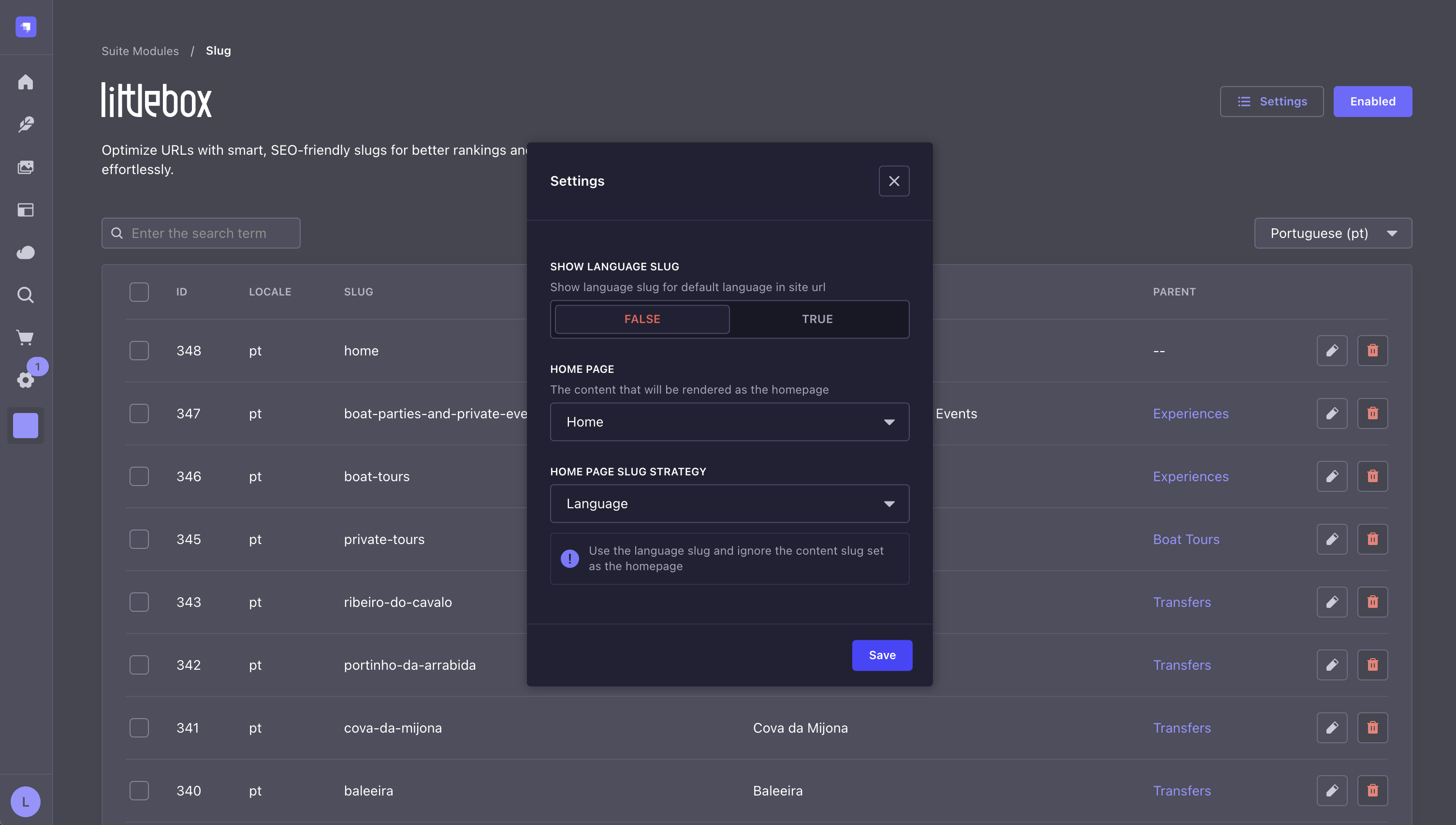 **Show language slug**\
Defines whether the default language appears in the URL.
For example, if the default language is `en` and the parameter is set to `false`, the URL will be `domain.com/news`.
If the parameter is set to `true`, the URL will be `domain.com/en/news`.
**Home page**\
Defines which document is used as the home page.
The content of this document is injected into the template defined within it.
Read more about [templates](/backend/guides/page-attributes#template). In the list of slugs, the document set as the homepage will display an identification tag.
**Show language slug**\
Defines whether the default language appears in the URL.
For example, if the default language is `en` and the parameter is set to `false`, the URL will be `domain.com/news`.
If the parameter is set to `true`, the URL will be `domain.com/en/news`.
**Home page**\
Defines which document is used as the home page.
The content of this document is injected into the template defined within it.
Read more about [templates](/backend/guides/page-attributes#template). In the list of slugs, the document set as the homepage will display an identification tag.
 **Home page slug strategy**\
Defines which strategy to use for the homepage slug. The following strategies are available:
* `Language` Every document has a slug. When a document is set as the homepage, the system ignores the slug defined
for that document and uses the language slug instead. For example, if the document with the slug `/news` is set as the homepage,
the system does not add the slug for the default language, so accessing the root domain `domain.com` will open it.
For other languages, the system adds the language slug, such as `domain.com/pt`, which opens the "news" document
as the homepage in Portuguese.
* `Content` The system uses the slug set in the document assigned as the homepage.
## How to create a slug?
**Step 1**: Access the Strapi admin panel.\
**Step 2**: Go to the Content-Type Builder.\
**Step 3**: Select the collection or single type that will be exposed to the frontend through the API.\
**Step 4**: Click "Add another field to this component".\
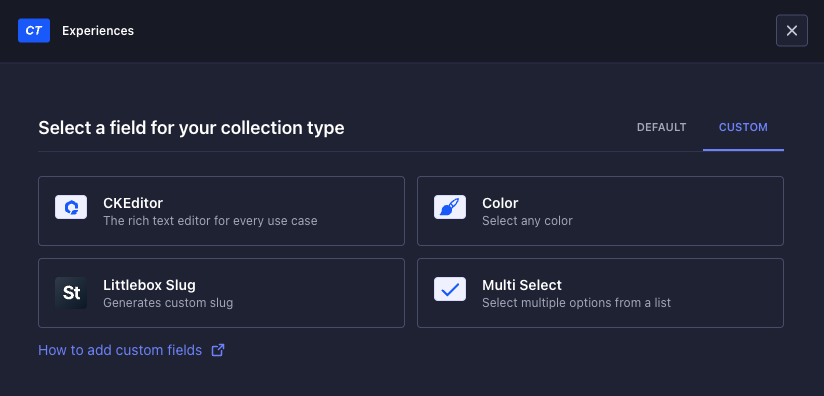
**Step 5**: Go to the Custom tab.\
**Step 6**: Select the "Littlebox Slug" field.\
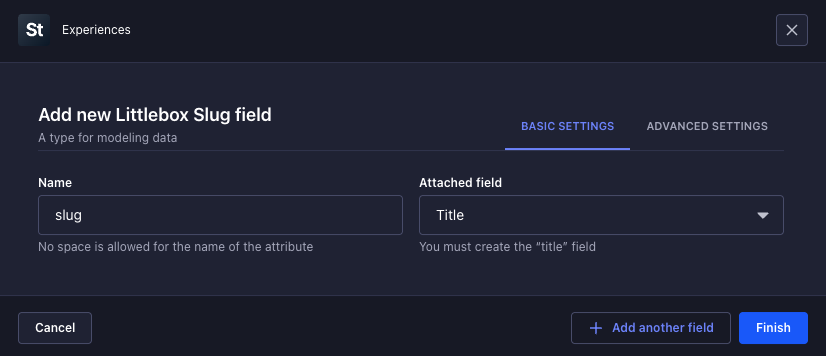
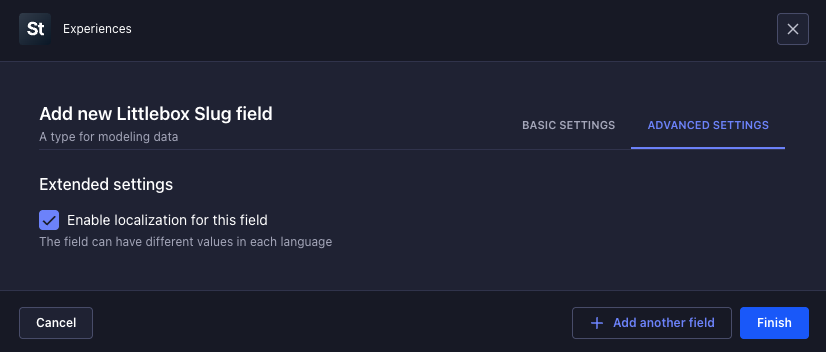
**Step 7**: Fill in the following settings:
**Home page slug strategy**\
Defines which strategy to use for the homepage slug. The following strategies are available:
* `Language` Every document has a slug. When a document is set as the homepage, the system ignores the slug defined
for that document and uses the language slug instead. For example, if the document with the slug `/news` is set as the homepage,
the system does not add the slug for the default language, so accessing the root domain `domain.com` will open it.
For other languages, the system adds the language slug, such as `domain.com/pt`, which opens the "news" document
as the homepage in Portuguese.
* `Content` The system uses the slug set in the document assigned as the homepage.
## How to create a slug?
**Step 1**: Access the Strapi admin panel.\
**Step 2**: Go to the Content-Type Builder.\
**Step 3**: Select the collection or single type that will be exposed to the frontend through the API.\
**Step 4**: Click "Add another field to this component".\
**Step 5**: Go to the Custom tab.\
**Step 6**: Select the "Littlebox Slug" field.\
**Step 7**: Fill in the following settings:
 **Step 8**: Click "Add another field to this component" again.\
**Step 9**: Select the "Text" field.\
**Step 10**: Fill in the following settings:
**Step 8**: Click "Add another field to this component" again.\
**Step 9**: Select the "Text" field.\
**Step 10**: Fill in the following settings:
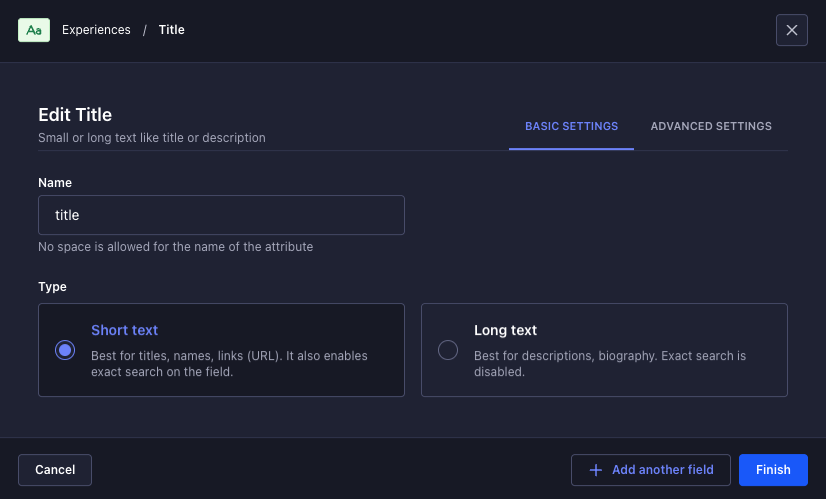
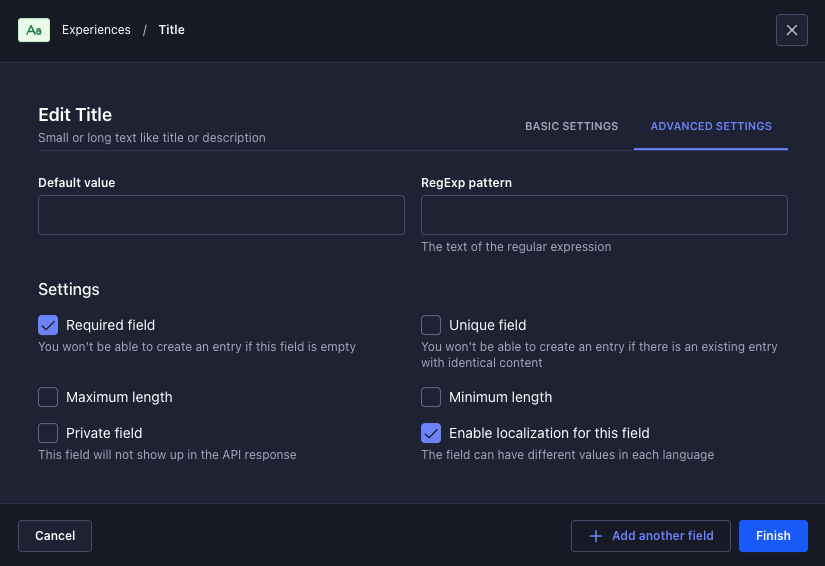 The document now includes a slug field.
The slug can be attached to the title field, so it updates automatically when the title changes. To do this, click the icon next to the `Edit` button.
The document now includes a slug field.
The slug can be attached to the title field, so it updates automatically when the title changes. To do this, click the icon next to the `Edit` button.
 When the `Edit` button is clicked and changes are saved, the slug is detached from the title, and the two fields become independent.
 ## API
### Get data for pages
To get the data from the frontend, use your preferred HTTP client:
```bash theme={null}
curl -X GET "/api/littlebox-strapi-suite/modules/pages?slug="
```
```json theme={null}
{
"document": {
"id": 26,
"documentId": "i111r5p3pa73r6tm71b7lh86",
"title": "Littlebox Suite helped me build websites faster",
"slug": "news/littlebox-suite-helped-me-build-websites-faster",
"createdAt": "2025-04-13T21:32:18.148Z",
"updatedAt": "2025-04-13T21:50:12.142Z",
"publishedAt": "2025-04-13T21:50:12.161Z",
"locale": "en",
"localizations": [
{
"id": 27,
"documentId": "i111r5p3pa73r6tm71b7lh86",
"title": "Littlebox Suite ajudou-me a construir sites mais rápido",
"slug": "pt/noticias/littlebox-suite-ajudou-me-a-construir-sites-mais-rapido",
"createdAt": "2025-04-13T21:37:55.693Z",
"updatedAt": "2025-04-13T22:05:35.160Z",
"publishedAt": "2025-04-13T22:05:35.185Z",
"locale": "pt"
}
]
}
}
```
The default language won't show up in the URL slug if the `SHOW LANGUAGE SLUG` setting is turned off in the slug module settings.
### Get data for homepage
To get the data from the frontend, use your preferred HTTP client:
```bash theme={null}
curl -X GET "/api/littlebox-strapi-suite/modules/pages/home?properties=attributes"
```
```json theme={null}
{
"document": {
"id": 53,
"documentId": "un6hqh6smm657hwf0n06xm72",
"title": "Home PT",
"slug": "",
"createdAt": "2025-04-14T19:38:34.673Z",
"updatedAt": "2025-04-14T22:19:21.242Z",
"publishedAt": "2025-04-14T22:19:21.270Z",
"locale": "pt",
"localizations": [
{
"id": 59,
"documentId": "un6hqh6smm657hwf0n06xm72",
"title": "Home EN",
"slug": "en",
"createdAt": "2025-04-14T22:19:29.371Z",
"updatedAt": "2025-04-14T23:45:50.177Z",
"publishedAt": "2025-04-14T23:45:50.210Z",
"locale": "en"
},
{
"id": 61,
"documentId": "un6hqh6smm657hwf0n06xm72",
"title": "Home EU",
"slug": "en-eu",
"createdAt": "2025-04-15T10:49:50.490Z",
"updatedAt": "2025-04-15T10:49:51.244Z",
"publishedAt": "2025-04-15T10:49:51.263Z",
"locale": "en-EU"
}
]
},
"attributes": {
"template": "default",
"priority": "0.5",
"frequency": "weekly"
}
}
```
To return the page content, add the value "content": `properties=attributes,content`
Learn how our frontend streamlines integration with Strapi by automating repetitive tasks.
Explore our hosting solutions for staging and production environments.
## API
### Get data for pages
To get the data from the frontend, use your preferred HTTP client:
```bash theme={null}
curl -X GET "/api/littlebox-strapi-suite/modules/pages?slug="
```
```json theme={null}
{
"document": {
"id": 26,
"documentId": "i111r5p3pa73r6tm71b7lh86",
"title": "Littlebox Suite helped me build websites faster",
"slug": "news/littlebox-suite-helped-me-build-websites-faster",
"createdAt": "2025-04-13T21:32:18.148Z",
"updatedAt": "2025-04-13T21:50:12.142Z",
"publishedAt": "2025-04-13T21:50:12.161Z",
"locale": "en",
"localizations": [
{
"id": 27,
"documentId": "i111r5p3pa73r6tm71b7lh86",
"title": "Littlebox Suite ajudou-me a construir sites mais rápido",
"slug": "pt/noticias/littlebox-suite-ajudou-me-a-construir-sites-mais-rapido",
"createdAt": "2025-04-13T21:37:55.693Z",
"updatedAt": "2025-04-13T22:05:35.160Z",
"publishedAt": "2025-04-13T22:05:35.185Z",
"locale": "pt"
}
]
}
}
```
The default language won't show up in the URL slug if the `SHOW LANGUAGE SLUG` setting is turned off in the slug module settings.
### Get data for homepage
To get the data from the frontend, use your preferred HTTP client:
```bash theme={null}
curl -X GET "/api/littlebox-strapi-suite/modules/pages/home?properties=attributes"
```
```json theme={null}
{
"document": {
"id": 53,
"documentId": "un6hqh6smm657hwf0n06xm72",
"title": "Home PT",
"slug": "",
"createdAt": "2025-04-14T19:38:34.673Z",
"updatedAt": "2025-04-14T22:19:21.242Z",
"publishedAt": "2025-04-14T22:19:21.270Z",
"locale": "pt",
"localizations": [
{
"id": 59,
"documentId": "un6hqh6smm657hwf0n06xm72",
"title": "Home EN",
"slug": "en",
"createdAt": "2025-04-14T22:19:29.371Z",
"updatedAt": "2025-04-14T23:45:50.177Z",
"publishedAt": "2025-04-14T23:45:50.210Z",
"locale": "en"
},
{
"id": 61,
"documentId": "un6hqh6smm657hwf0n06xm72",
"title": "Home EU",
"slug": "en-eu",
"createdAt": "2025-04-15T10:49:50.490Z",
"updatedAt": "2025-04-15T10:49:51.244Z",
"publishedAt": "2025-04-15T10:49:51.263Z",
"locale": "en-EU"
}
]
},
"attributes": {
"template": "default",
"priority": "0.5",
"frequency": "weekly"
}
}
```
To return the page content, add the value "content": `properties=attributes,content`
Learn how our frontend streamlines integration with Strapi by automating repetitive tasks.
Explore our hosting solutions for staging and production environments.