> ## Documentation Index
> Fetch the complete documentation index at: https://strapi-suite.littlebox.pt/llms.txt
> Use this file to discover all available pages before exploring further.
# Translations
> Learn how to create translations and connect them to the frontend using the API
The translations module adapts the content of a website or app to different languages, making it easier for users
from various regions to access. Strapi already provides built-in solutions for document internationalization. However,
this module is useful for standalone translations that do not belong to any document context.
## How to create translations?
**Step 1**: Access the Strapi admin panel.\
**Step 2**: Go to the Littlebox Strapi Suite.\
**Step 3**: Select "Translation".\
**Step 4**: Click "Create new entry".
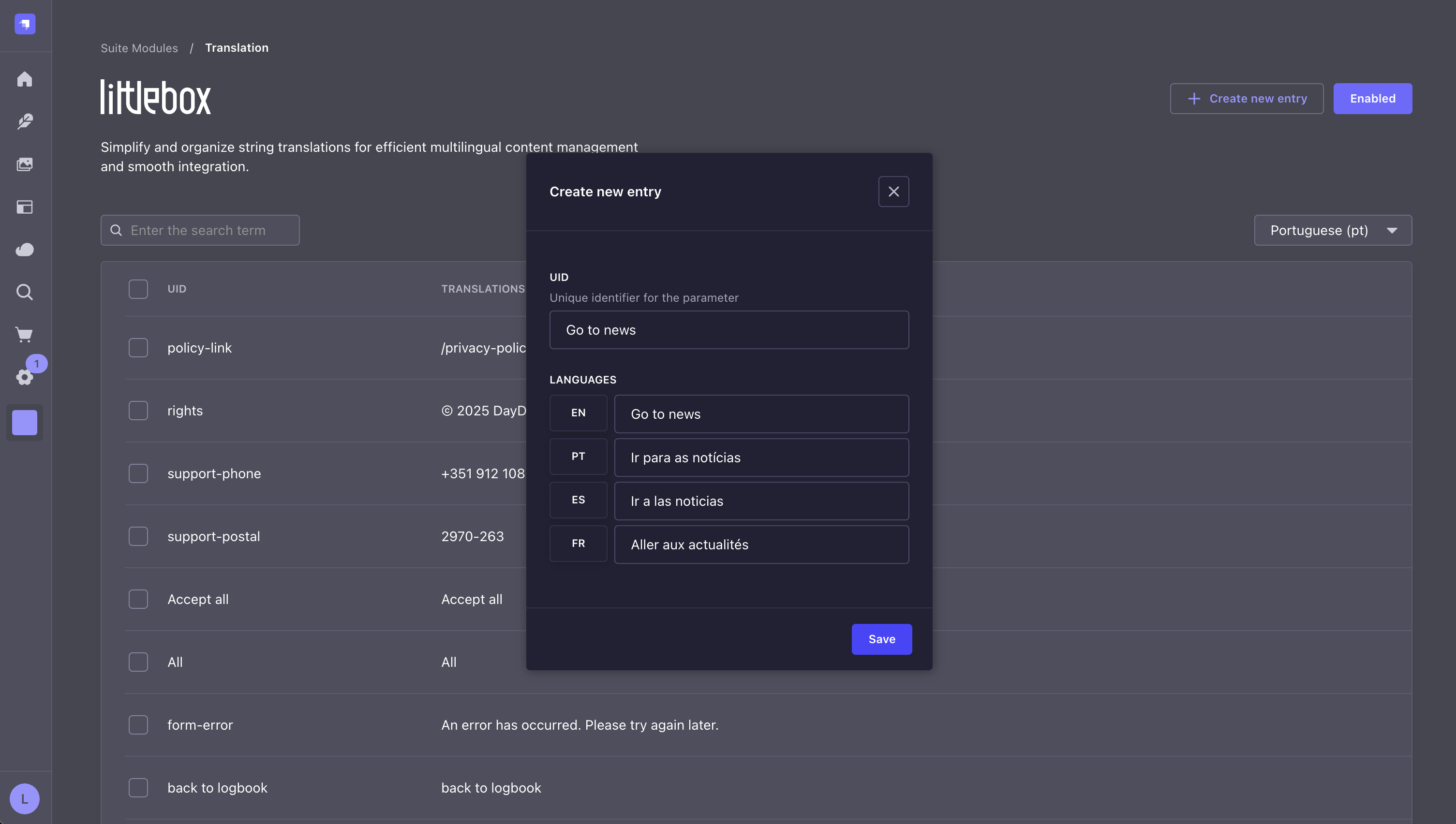 Use simple text as the UID for short content, or use an ID for longer or more complex text. In the example above, the text itself serves as the UID because it is simple. However, if it is necessary to include, for example, HTML, use an alias as the UID.
## API
To get the data from the frontend, use your preferred HTTP client:
```bash theme={null}
curl -X GET "/api/littlebox-strapi-suite/modules/translations"
```
```json theme={null}
[
{
"id": 5,
"uid": "About us",
"translations": {
"en": "About us",
"pt": "Sobre nós"
}
},
{
"id": 3,
"uid": "Book now",
"translations": {
"en": "Book now",
"pt": "Reserve agora"
}
}
]
```
With this data, translations can be used with the front-end technology of your choice.\
However, if you prefer, you can use our [ready-to-go Next.js frontend](/frontend/introduction) as a base, which already implements these solutions.
Learn how our frontend streamlines integration with Strapi by automating repetitive tasks.
Explore our hosting solutions for staging and production environments.
Use simple text as the UID for short content, or use an ID for longer or more complex text. In the example above, the text itself serves as the UID because it is simple. However, if it is necessary to include, for example, HTML, use an alias as the UID.
## API
To get the data from the frontend, use your preferred HTTP client:
```bash theme={null}
curl -X GET "/api/littlebox-strapi-suite/modules/translations"
```
```json theme={null}
[
{
"id": 5,
"uid": "About us",
"translations": {
"en": "About us",
"pt": "Sobre nós"
}
},
{
"id": 3,
"uid": "Book now",
"translations": {
"en": "Book now",
"pt": "Reserve agora"
}
}
]
```
With this data, translations can be used with the front-end technology of your choice.\
However, if you prefer, you can use our [ready-to-go Next.js frontend](/frontend/introduction) as a base, which already implements these solutions.
Learn how our frontend streamlines integration with Strapi by automating repetitive tasks.
Explore our hosting solutions for staging and production environments.