

littlebox-suite-helped-me-build-websites-faster in
domain.com/news/littlebox-suite-helped-me-build-websites-faster. Clear slugs are easy to read and share, and they
help search engines understand what the page is about.
The “Littlebox Slug” field builds the slug of a document from its title. The frontend then finds the document
through the API with that slug. This page explains the field itself. To set up the slug module (the default
language in the URL, the home page and more), read the Slug guide.
Before you start
- Turn on internationalization (i18n) for the content type. Without it, the field shows “Activate internationalization to use this feature.” instead of the slug.
- Turn on the slug module in the Littlebox Strapi Suite. While the module is off, the field stays hidden.
- Add a “Text” field called
titleto the content type. The slug follows this field.
Create the field
Step 1: Access the Strapi admin panel.Step 2: Go to the Content-Type Builder.
Step 3: Select the collection type or single type that the frontend shows as a page.
Step 4: Click “Add another field”.
Step 5: Go to the Custom tab.
Step 6: Select “Littlebox Slug”.
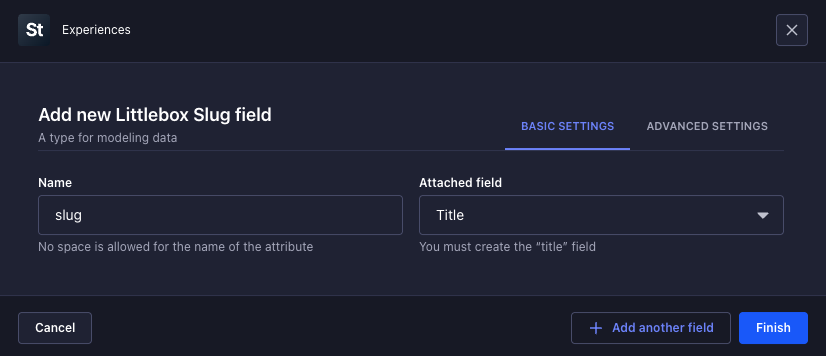
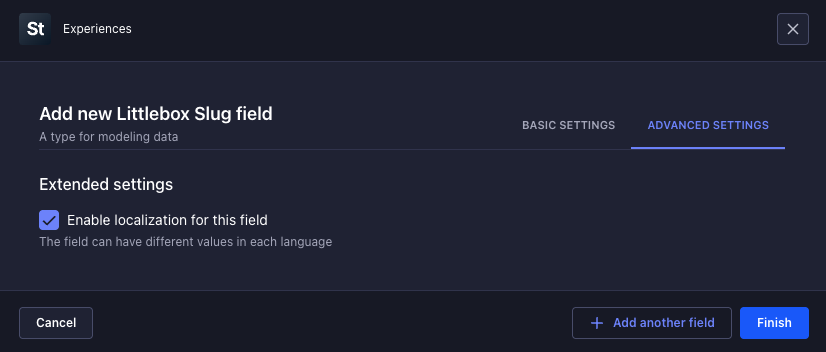
Step 7: In the basic settings, type a name for the field, for example
slug, and set “Attached field” to
“Title”. The field needs an attached field.
How the field works
In the Content Manager, the field shows the full path of the page: the language, the parent page and the slug.

The prefix
The gray text before the slug shows the start of the URL:- The language, for example
/pt/. The default language shows only when “Show language slug” is on in the slug settings. - The parent page, when the document has one in its page attributes. For
example, an article under “News” gets
/news/before its slug.
Slug rules
Strapi cleans what you type, so every slug is safe to use in a URL:Unique slugs
Two documents can’t share the same slug under the same parent page in the same language. If you save a slug that is already in use, Strapi adds a number at the end to keep it unique, for examplesummer-sale-1764238500000.
Change it by hand if you prefer a cleaner slug.
The same slug can exist in different languages or under different parent pages, because the full URL is still
different. For example, /news/launch and /blog/launch can both exist.